
Build the client record
Keep company information, contacts, services and accounting periods together. Use relevant Companies House information alongside your practice records.
For accountants and bookkeepers
Accountancy practice management, connected to your CRM. Bring client records, onboarding, services, jobs and deadlines into a clearer working day.
The practice module is enabled for your account as part of setup.
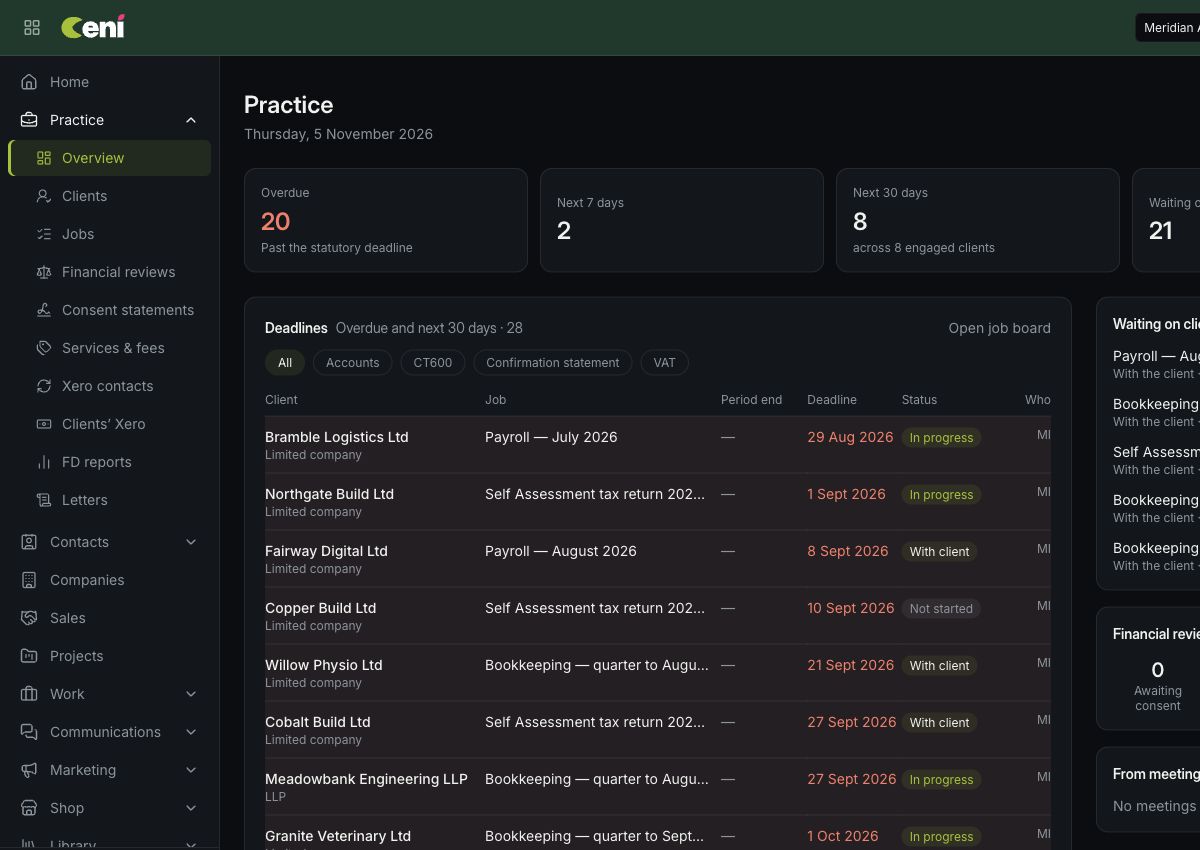
See overdue work, deadlines in the next seven or thirty days, and jobs waiting on clients. Filter by service and open the job or client record for the detail.
See approaching statutory deadlines and the jobs behind them.
Understand ownership, progress and the next task.
Keep work waiting on a response separate from work your team can move forward.
Keep company information, contacts, services and accounting periods together. Use relevant Companies House information alongside your practice records.
Track engagement letters and due-diligence records. See missing information, keep supporting evidence and offer generated engagement letters for signing through the client portal.
Maintain your service list and agreed fees. Organise jobs and deadlines for annual accounts, corporation tax, confirmation statements and VAT returns. Job generation depends on reviewed client setup and enabled services.
Assign jobs and tasks, track progress and distinguish work with your team from work waiting on a client. Keep review and completion visible.
Your practice module uses the wider Ceni platform. Keep emails, calls, notes, bookings and follow-ups connected to the people you serve.
Use published practice templates for engagement and review letters, with services and agreed fees connected to the client.
Manage staff-entered review information, consent statements and versioned letters with access limited to the appropriate roles.
Match practice clients with Xero contacts for supported receivables information when the connection and feature are enabled.
Where monthly FD reporting is enabled, work from the client’s linked Xero organisation and keep the figures, checks and approved report together.
Choose a completed month, review the figures and check supporting evidence. Map accounts to consistent report headings.
Check commentary, warnings and actions. Review the client and internal PDFs before an Owner approves the exact version.
Send the approved client copy separately to authorised portal contacts. Internal working notes stay with your practice.
Reports are prepared and shared deliberately. Monthly reporting requires activation and a linked client Xero organisation; it does not automatically file tax returns.
Explore reporting and practice featuresWe’ll walk through your client services, responsibilities and onboarding process, then help you enable the practice module for your account.
Ceni organises your practice work and records. Your team remains responsible for checking client information, deadlines and professional requirements.
See how Ceni can support the way your team works, from the first enquiry to the next deadline.
Book a practice demoChoose a 30-minute demo and tell us you’re interested in practice management.